Skip to content
CYGM 31 online Get started
NewCYGM+, with a 3.5-inch screen

Glucose you can read from across the room.

CYGM is a small screen that shows the reading your CGM already shares. Put it on a nightstand, a desk or a kitchen counter, and check the number with a glance instead of a phone.

  • No CYGM account
  • No subscription
  • Nothing to solder
  • Open source
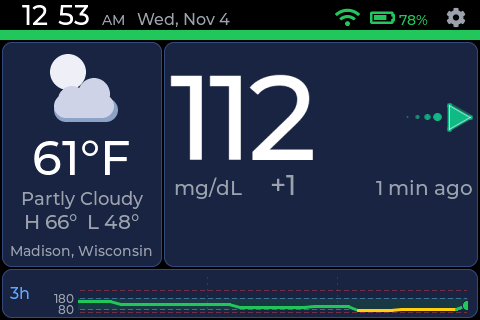
CYGM+ home screen: 112 mg/dL with a flat arrow beside a weather card and a three-hour chart.

A working copy of the CYGM+ screen, with sample readings and your own clock. Try a reading to see what changes.

How it works

It shows what your CGM already shares

CYGM never touches the sensor. It signs in to your CGM's sharing service as a follower, the same way a family member's phone does, and puts the number on a screen of its own.

  1. Sensor

    Measures glucose, every few minutes.

  2. CGM app

    Your phone or receiver gets the reading and shares it.

  3. Sharing service

    Dexcom Share, LibreLinkUp or your Nightscout site.

  4. CYGM

    Checks about every 90 seconds and shows it on the screen.

Which CGM do you use?

  1. In the Dexcom app, turn on Share and check there is at least one follower.
  2. On CYGM, open Settings, then CGM, then Dexcom Share.
  3. Sign in with the username and password you use for the Dexcom app.
Full Dexcom setup
  1. In the Libre app, open Connected Apps, then LibreLinkUp, and invite a follower.
  2. Accept the invitation in LibreLinkUp until it shows a live number.
  3. On CYGM, pick LibreLinkUp and sign in with that follower's account.
Full Libre setup
  1. In Nightscout's Admin Tools, add a subject with the readable role only.
  2. Copy the access token it makes. Not your API secret.
  3. On CYGM, pick Nightscout and enter your site address and that token.
Full Nightscout setup

Made for

Everyone keeping an eye on the number

A CYGM in a yellow case on a desk at night, showing the time, a moon, and a reading of 274 mg/dL.

Check from the doorway at 3am

See the number without unlocking a phone or switching on a light. CYGM signs in as a follower, so your child's own CGM app keeps working exactly as it did.

  • Alarms you set yourself, from urgent low to no data.
  • A screen that stays on and is easy to read in the dark.
  • Keep your phone's CGM alarms on too. CYGM is a second screen.
For parents and caregivers
A CYGM in a yellow case showing the alarm tone menu: Beep 1, Beep 2, Beep 3 and Chime.

Build your own, then make it yours

No soldering and no special tools. Print the case in your favourite colour, plug in the board, and install the software from a web browser. Then pick how your alarms sound.

  • A real electronics project you can finish in an evening.
  • Your number, big enough to read from across your room.
  • Build it with a grown-up. The guide walks you through every step.
See how it's built
A CYGM in a purple case on a wooden desk, showing a glucose reading beside the clock and weather.

A follower screen for the nurse's office

With the family's permission, CYGM signs in as one more follower. Staff can see a student's number at a glance without carrying a phone around, and the student's own phone and app don't change.

  • Place it where staff can see it and classmates can't.
  • When readings stop arriving, it says so instead of showing an old number.
  • It also makes a great no-solder build for a science class.
Setting it up for someone else
A CYGM in a grey case showing a WiFi Disconnected notice with Settings and Dismiss buttons.

What it is, and what it isn't

CYGM is an open-source secondary display. It reads the same shared data a follower app receives. It doesn't measure glucose, can't dose insulin, and isn't FDA-cleared.

  • Readings pass through the manufacturer's cloud first, so they can lag or stop. When they stop, the screen says so.
  • There is no CYGM account, and no CYGM server stores readings.
  • The full source code is public, for anyone to review.
Health data and safety

Two sizes

Pick your CYGM

Both work with the same CGMs and the same kinds of alarms. CYGM+ is the new one, with a bigger, sharper screen. CYGM is the original, and the cheapest way in.

CYGM+

NewBeta 2.0.25

A 3.5-inch screen that's sharper and smoother, a battery charger built in, and a speaker that can read you the weather.

About $56in parts, plus a printed case

Screen
3.5″ touch, 480 × 320
Battery
Optional, charges over USB
Speaker
Optional 3 W, speaks the weather
Updates
Over Wi-Fi

CYGM

v1.1.10

The original 2.8-inch display, with a night face, 28 alarm tones and optional logging to an SD card.

About $40in parts, plus a printed case

Screen
2.8″ touch, 320 × 240
Battery
Optional
Logging
Optional SD card
Updates
Over Wi-Fi

Screens are shown at their true size relative to each other.

Compare every detail
FeatureCYGM+CYGM
Screen3.5″ capacitive touch, 480 × 3202.8″ capacitive touch, 320 × 240
BoardJC3248W535C (ESP32-S3)JC2432W328C (ESP32)
Works withDexcom Share, LibreLinkUp, NightscoutDexcom Share, LibreLinkUp, Nightscout
AlarmsUrgent high, high, low, urgent low, predicted low, no data, quiet hoursFour tiers, 28 tones, quiet hours, escalating volume
BatteryOptional 3000 mAh, charger built inOptional
SpeakerOptional 3 W, with spoken weatherOptional
Updates over Wi-FiYesYes
InstallFrom this site, in Chrome or EdgeFrom this site, in Chrome or Edge
PartsAbout $56About $40
StatusBeta 2.0.25Release, v1.1.10

Get started

Up and running in an evening

  1. Get the parts

    One touchscreen board does nearly everything. A battery and a speaker are optional, and the case prints on any home 3D printer.

  2. Install from your browser

    Plug the board into a computer, open this site in Chrome or Edge and press Install. Nothing to download. Later updates arrive over Wi-Fi.

  3. Sign in on the screen

    The screen walks you through Wi-Fi, your location and your CGM. Set your alarms, and it's ready for the nightstand.

CYGM+ build guide coming soon. You can buy the parts and print the case today, so you're ready the day it lands.

CYGM+ parts and case

31 CYGMs are running right now

All checked in during the last half hour, from 26 cities around the world.

Open the full map

Grouped by city, never by device. A city appears when at least one device there has checked in within the last half hour. Placement is approximate.

Privacy

Your readings never come near this site

  • No CYGM account. The display signs in to your CGM service directly and keeps that sign-in on the device.
  • Two small check-ins. It asks this site whether there is an update, and sends a heartbeat so it can be counted on the map. That carries a device identifier, the firmware version on newer builds, and your city and rounded coordinates if you set a weather location. My server looks up a city from the heartbeat's address through ipwho.is and keeps only the city. Never a reading, a password or a setting.
  • Open source. Every line is on GitHub, so you never have to take my word for it.
Exactly what is sent, and to whom

Why this exists

When my step-daughter was diagnosed with type 1 diabetes, the number we needed most lived on a phone in another room. The screens you could buy were expensive, closed, and usually came with a subscription. So I made the opposite.
Carl BrothersBuilt CYGM for his own family · About me

Part of #WeAreNotWaiting, the community of people with diabetes and their families building their own tools. Read what other people have built, or meet the people who helped.